![PayNW New Logo.jpg]](https://21910005.hs-sites.com/hs-fs/hubfs/PayNW%20New%20Logo.jpg?height=40&name=PayNW%20New%20Logo.jpg)
Administrators and other users with applicable permissions now have the ability to see all saved views that exist for their organization inside of the My Saved Reports tab in the Report Hub.
See All Saved Reports Security Settings
Navigation: Settings > Profile/Policies > Security
-
Navigate to Reports Tab in the Admin security profile.
-
Within the Report Hub section, check box for All Company Employees next to the My Saved Reports permission.
Note: If its not toggled on, My Saved Reports Permission needs to be toggled on too.
-
Save.
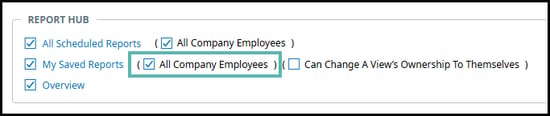
In addition, administrators and other users with applicable permissions can now change the ownership of a saved view to themselves.
Change Ownership of Saved Reports Settings
Navigation: Settings > Profile/Policies > Security
-
Navigate to Reports Tab in the Admin security profile.
-
Within the Report Hub section, check box for Can Change A View’s Ownership To Themselves next to the My Saved Reports and All Company Employees permissions.
Note: If its not toggled on, My Saved Reports and All Company Employees permissions needs to be toggled on too.
-
Save.

Resources:
UKG Online Documentation